
Sharing a Multi-Port Charger? USB-C vs. USB-A Changes Your Mac's Charging Speed
A multi-port charger sounds like it should give a MacBook its full rated wattage whenever a spare port is free. It doesn't — and in the chargers tested, the type of port a second device uses changed how much was left over for the Mac. Plugging a phone into a USB-A port instead of a second USB-C port left noticeably more headroom for the Mac's charging speed.
It's the kind of thing that's not really worth memorizing, since every charger can split its shared power budget differently, and there's no quick way to tell just by looking at it or checking the wattage printed on the box. That's exactly the gap WattsConnected's Charger History tab is built to fill: it logs the actual negotiated wattage for every session automatically, so you can just glance at the number instead of guessing. Install WattsConnected and skip the guesswork.
The key findings
- USB-A costs the Mac less than USB-C. In the chargers tested, moving a second device from a USB-C port to a USB-A port recovered a real chunk of wattage for the Mac: 65W instead of 45W on one charger, 47W instead of 45W on another.
- It's the port type, not just how many ports are in use. Adding a third device on USB-A didn't move the Mac's wattage at all — only putting a second device on USB-C did.
- It's not something you'd stumble onto. These tiers aren't printed on the box, and even if a charger's exact behavior is written down somewhere — a manual, fine print, a manufacturer's spec page — it's not something most people would think to go looking for.
| Watts Reported on Mac | ||
|---|---|---|
| Scenario | 100W Charger | 67W Charger |
| Mac Only (USB-C) | 100W | 67W |
| Mac (USB-C) + iPhone (USB-C) | 45W | 45W |
| Mac (USB-C) + iPhone (USB-A) | 65W | 47W |
| Mac (USB-C) + iPhone (USB-A) + iPad (USB-C) | 45W | 45W |
Charger 1: 100W, four ports
One MacBook stayed connected to the same USB-C port on this charger throughout. Only the other three ports changed:
- Mac alone, USB-C port: negotiates the full 100W.
- + iPhone on the second USB-C port: Mac drops to 45W.
- iPhone moved to a USB-A port instead (Mac still alone on USB-C otherwise): Mac climbs back up to 65W.
- + iPad added to the second USB-C port (iPhone still on USB-A): Mac drops to 45W again.
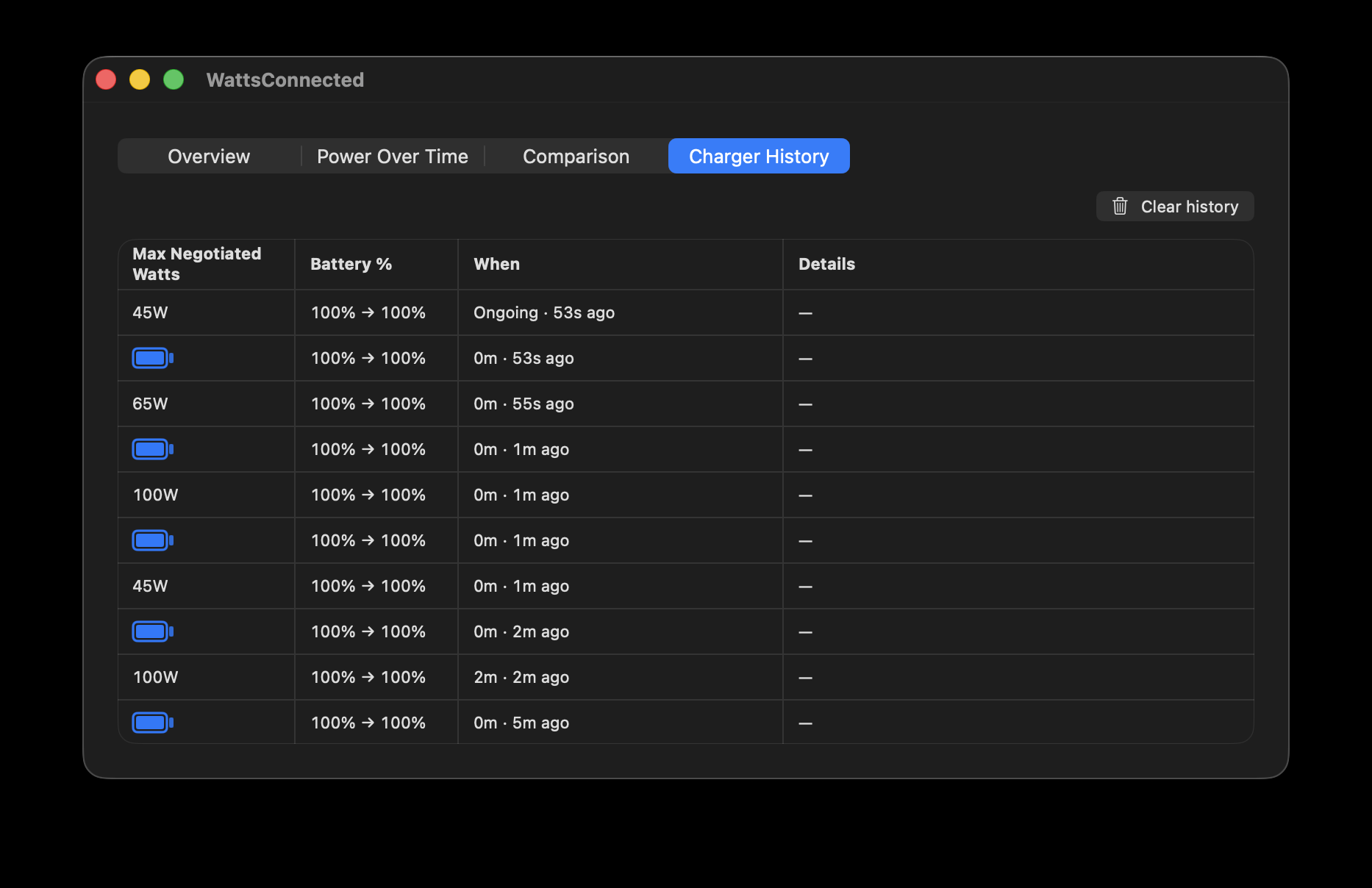
Charger 2: 67W, three ports
The same sequence, repeated on a different charger — a 67W model with two USB-C ports and only one USB-A port instead of two:
- Mac alone, USB-C port: negotiates the full 67W.
- + iPhone on the second USB-C port: Mac drops to 45W.
- iPhone moved to a USB-A port instead: Mac climbs back up to 47W.
- + iPad added to the second USB-C port (iPhone still on USB-A): Mac drops to 45W again.
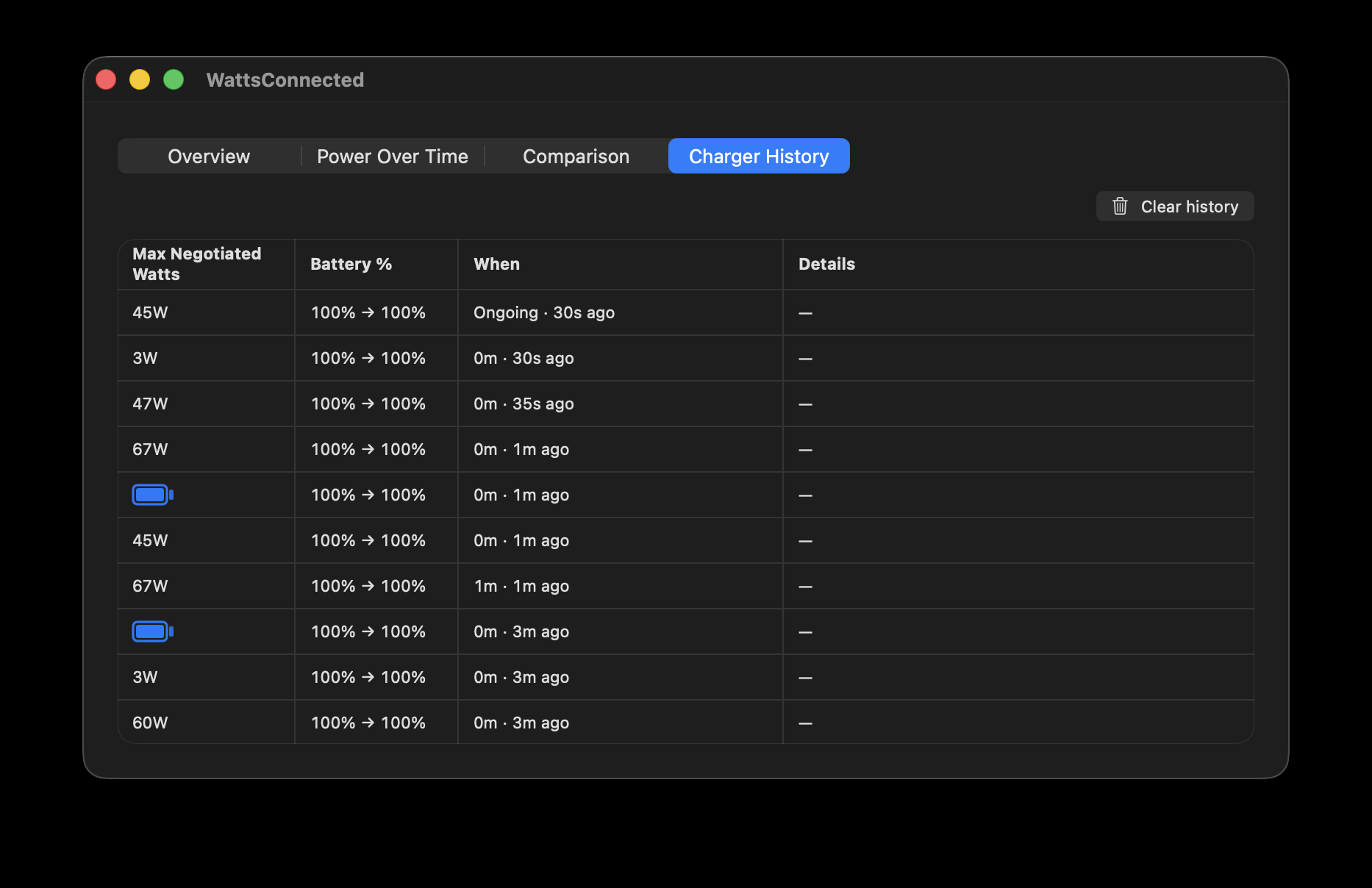
On both chargers, the result was identical whether the Mac was connected over a USB-C cable or MagSafe, which rules out the cable as a factor — this comes down to the charger's internal power budget, allocated by port, not by device.
Why port type seems to matter
Multi-port chargers don't split their rated wattage evenly across however many ports happen to be active. Internally, they run a power-management chip that allocates the shared budget based on which specific ports are drawing current — and in the chargers tested, USB-C and USB-A ports weren't treated as interchangeable slots. A second USB-C port competes with the Mac's USB-C port for the same high-power negotiation path, so occupying it cut deep. A USB-A port is physically capped much lower to begin with (USB-A can't negotiate the same wattage a USB-C Power Delivery port can), so putting a phone there instead left noticeably more of the budget for the Mac's USB-C port.
It also shows up in the final step of both charger walkthroughs above: adding the iPad didn't change what the phone was doing on USB-A, but it put a second device on USB-C — and that's what dropped the Mac back to 45W each time. It's about which ports are occupied, not how many devices are connected.
What this means practically
If you're charging a Mac on a shared multi-port charger and want to keep its speed as high as possible, give other devices a USB-A port before a second USB-C port, if the charger has one. A phone or set of earbuds on USB-A cost the Mac far less headroom than the same device on USB-C in the chargers tested. And if you do need to run two high-power USB-C devices at once — say a Mac and an iPad — expect the Mac's ceiling to drop even though the charger's total rated wattage hasn't changed and nothing on the charger is anywhere near maxed out.
For background on how the negotiation itself works between a Mac and a charger, see USB-C Power Delivery Explained.
Port type isn't the only variable, either — which specific USB-C port you use, or even the order you plugged in, can matter just as much on some chargers. See Multi-Port Chargers: Does the Port You Use — Or When You Plugged In — Matter? Sometimes. for that part of the story.
For the bigger picture on why none of this is predictable in advance, see Why You Can't Predict How a Multi-Port Charger Will Treat Your Mac.
See this on your own charger
This is specific to each physical charger, so the only way to know your own charger's port-sharing behavior is to watch it happen — no setup required. Plug in, move devices between ports, and the pattern shows up in Charger History exactly like it did here.
A Few Notes
This reflects two chargers — a 100W 4-port (2×USB-C, 2×USB-A) model and a 67W 3-port (2×USB-C, 1×USB-A) model — tested the same way with one MacBook, an iPhone, and an iPad. The specific wattage tiers, and whether a charger reallocates power by port type at all, depend on that charger's internal power-management design and will differ across brands and models.