
Multi-Port Chargers: Does the Port You Use — Or When You Plugged In — Matter? Sometimes.
A previous test found that a second device sharing a USB-C port costs a Mac more speed than one sharing a USB-A port. That left an open question: once two devices are both on USB-C, what actually decides which one gets more power? On some chargers, it comes down to which specific port each device uses. On another, port didn't matter at all — instead, whichever device connected first consistently got the larger share. And on a couple of the chargers, neither one mattered, because the power was simply split evenly.
It's not something you can predict by looking at a charger, and that's exactly the kind of gap WattsConnected's Charger History tab is built to fill: it logs the actual negotiated wattage for every session automatically, so you can just glance at the number instead of guessing. Install WattsConnected and skip the guesswork.
The key findings
- Sometimes the port doesn't matter at all. On some of the chargers tested, the Air got the exact same wattage no matter which of the two USB-C ports it used.
- Sometimes the port matters a lot. On one charger, moving the Air from one USB-C port to the other changed its charging speed by more than double, with nothing else about the setup different.
- On a different charger, it wasn't the port at all — it was timing. Two USB-C ports, same charger, same two Macs — but this time swapping ports changed nothing. Instead, whichever Mac was plugged in first consistently got the larger share, no matter which port it ended up in.
- Which variable decides — port, order, or neither — is a property of the charger, not something you can predict in advance.
| Watts Reported on MacBook Air | |||
|---|---|---|---|
| Scenario | 35W Charger | 67W Charger | 100W Charger |
| Air Only (USB-C) | 35W | 67W | 100W |
| Air (Port 1) + Pro (Port 2) | 17W | 45W | 45W |
| Air (Port 2) + Pro (Port 1) | 17W | 20W | 45W |
On the 35W and 100W chargers, the last two rows match — the port didn't matter. On the 67W charger, they don't — the Air lost more than half its shared-charging speed just by being in the other port.
Why some chargers care and others don't
The honest answer is that it isn't clear yet. What the data does support: this is a property of the charger, not the device or the person using it. The same Macs, tested the same way, got treated fairly on some chargers, favored a specific port on another, and favored whoever connected first on another still. Nothing about the Macs changed between tests — only the charger did.
Four chargers isn't enough data to explain why one charger picks one behavior and another picks a different one. The safer conclusion is simply that chargers can be fair, or unfair in more than one way, and there's no way to tell which kind you have without checking.
What this means practically
If you regularly share a charger between two power-hungry USB-C devices — two Macs, a Mac and an iPad, or similar — it's worth checking how your specific charger behaves rather than assuming. Some chargers won't care which port you use or which device you plugged in first. Others will care about one of those things, and picking wrong could cost you more than half your charging speed — a bigger swing than you'd get from buying a different charger entirely. There's no way to know which situation you're in from the charger's price, wattage rating, or box — only by testing it.
For the USB-C vs. USB-A side of this story, see Sharing a Multi-Port Charger? USB-C vs. USB-A Changes Your Mac's Charging Speed.
For the bigger picture on why none of this is predictable in advance, see Why You Can't Predict How a Multi-Port Charger Will Treat Your Mac.
See this on your own charger
Move a second high-power USB-C device between your charger's two ports and watch what happens in Charger History. If the number doesn't change, try unplugging both and plugging them back in a different order instead. Between those two tests, you'll know whether your charger cares about port, timing, or neither — and which device to connect first (or plug into which port) if it turns out to matter.
How the tested chargers behaved
The rest of this is the detailed evidence behind the summary above — four chargers, tested the same way, for anyone who wants the receipts.
Charger 1: 35W, two USB-C ports
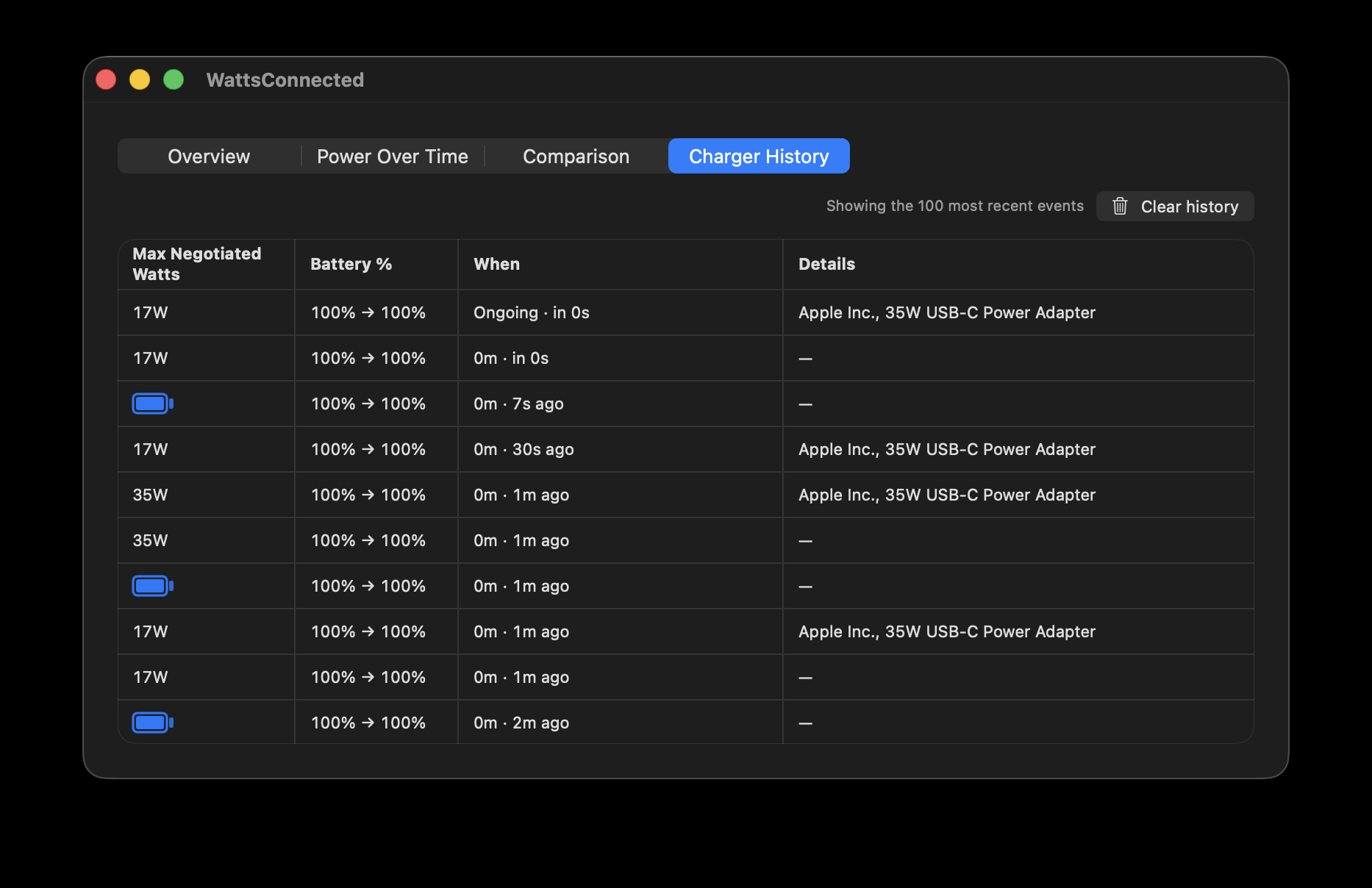
An Apple 35W two-port USB-C charger (identified directly in Charger History). Each pairing was tested with both Macs swapped between ports, and each was tested with both plug orders:
- Air alone, either port: negotiates the full 35W.
- Air (Port 1) + Pro (Port 2), Air plugged in first or second: Air gets 17W either way.
- Air (Port 2) + Pro (Port 1), Air plugged in first or second: Air gets 17W again.
Same result every time here — neither the port nor the plug order changed anything.
Charger 2: 67W, two USB-C ports (+1 USB-A)
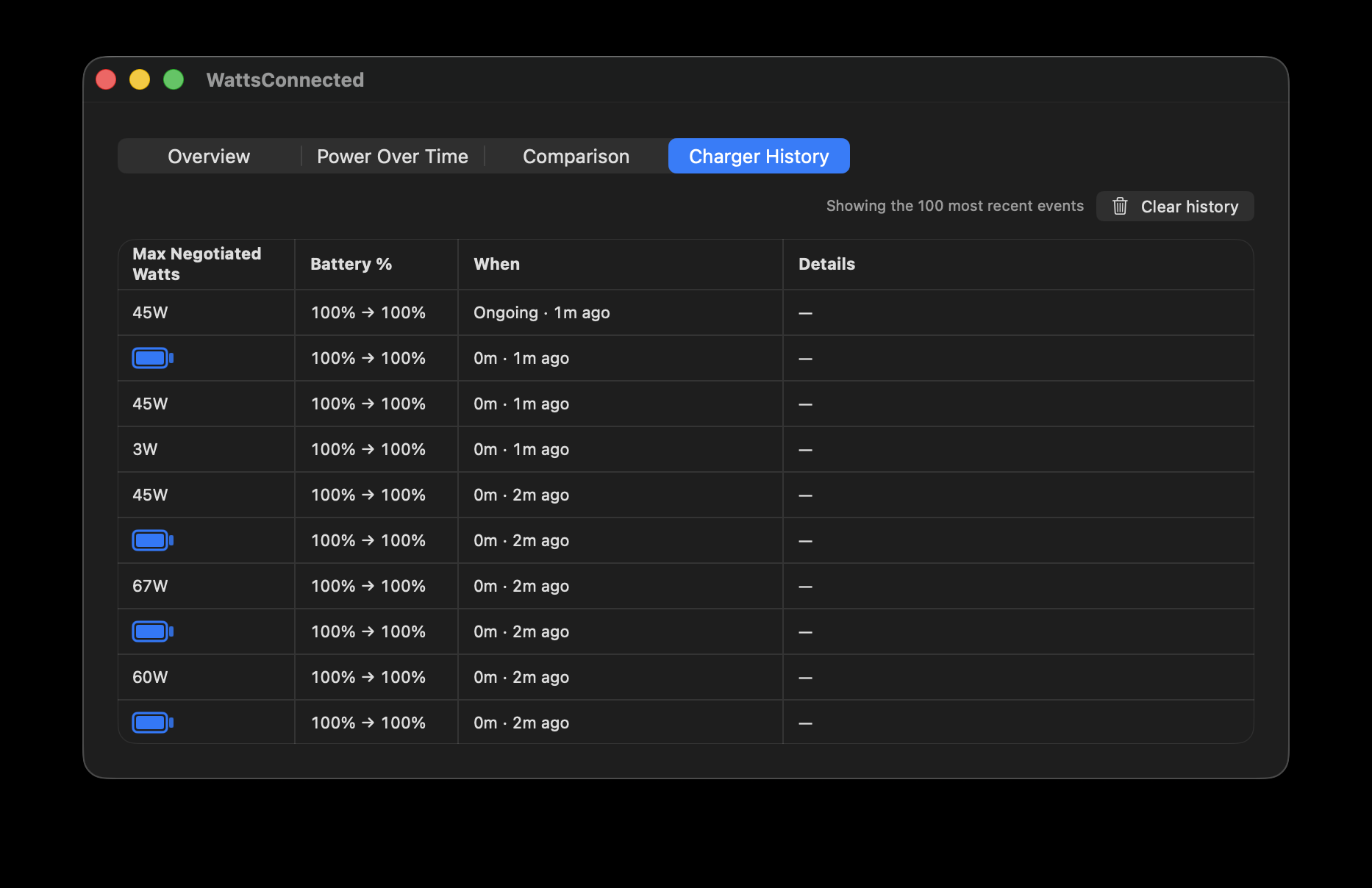
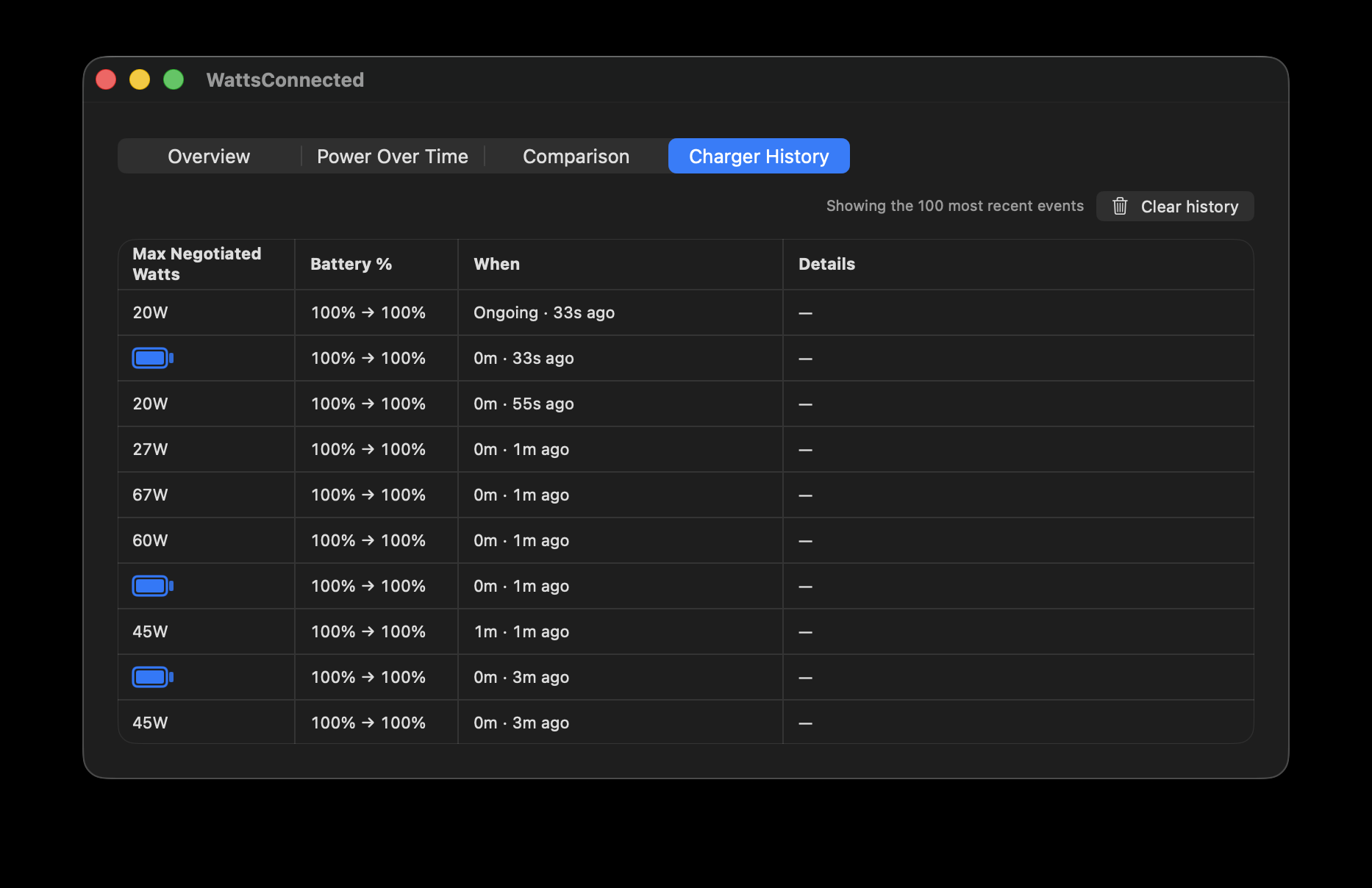
The same swap test, on the 67W charger used in the earlier USB-C vs. USB-A test:
- Air alone, either port: negotiates the full 67W.
- Air (Port 1) + Pro (Port 2), either plug order: Air gets 45W.
- Air (Port 2) + Pro (Port 1), either plug order: Air gets 20W.
Here the port genuinely decided the outcome, not the device or the order things were plugged in — whichever Mac ended up in Port 1 came out ahead.
Charger 3: 100W, two USB-C ports (+2 USB-A)
The same swap test, on the 100W charger used in the earlier USB-C vs. USB-A test. No screenshot was captured for this run, but the pattern was reported directly:
- Air alone, either port: negotiates the full 100W.
- Air (Port 1) + Pro (Port 2), either plug order: Air gets 45W.
- Air (Port 2) + Pro (Port 1), either plug order: Air gets 45W again.
Same as the 35W charger, port choice made no difference here — even though the two chargers have very different total ratings.
Charger 4: 65W, two USB-C ports
A different 65W charger, tested with two Macs the same way — except this time, moving devices between ports wasn't what changed the outcome:
- One Mac alone, either port: negotiates the full 65W.
- Two Macs sharing the charger: the power split 45W / 18W — and the Mac plugged in first got the larger share, regardless of which port either Mac used.
No screenshot was captured for this run, and this test didn't track which specific Mac model was plugged in first — just that whichever one connected first consistently won. Not every test needs a screenshot to be worth including; Charger History is there so you can see this kind of thing on your own gear whenever you want, not so every run gets individually documented here.
This is a genuinely different mechanism from the port-based one seen on the 67W charger. There, swapping ports flipped the outcome and plug order was irrelevant. Here, swapping ports did nothing and plug order decided everything. Two chargers, two completely different ways of being unfair.
A Few Notes
This reflects four chargers — 35W, 67W, 100W, and 65W, each with two USB-C ports — tested with MacBooks sharing the charger. Four chargers is enough to show that fair splitting, port-based favoritism, and order-based favoritism can all exist, but not enough to say how common any of them is, or to explain why a given charger behaves the way it does. Treat the specific wattage figures here as examples of what's possible, not as predictions for any particular charger you own.