
Does a Faster Charger Actually Charge Your Mac Faster? Only Sometimes.
This comes from a MacBook Air's real charging history in WattsConnected, built up across eight different chargers ranging from 20W to 100W. The Comparison tab plots charge rate (in percent per hour) against battery level for every charger you've used, and once enough sessions accumulate, a clear pattern emerges: charger wattage matters a lot when the battery is low, and barely at all once it's nearly full.
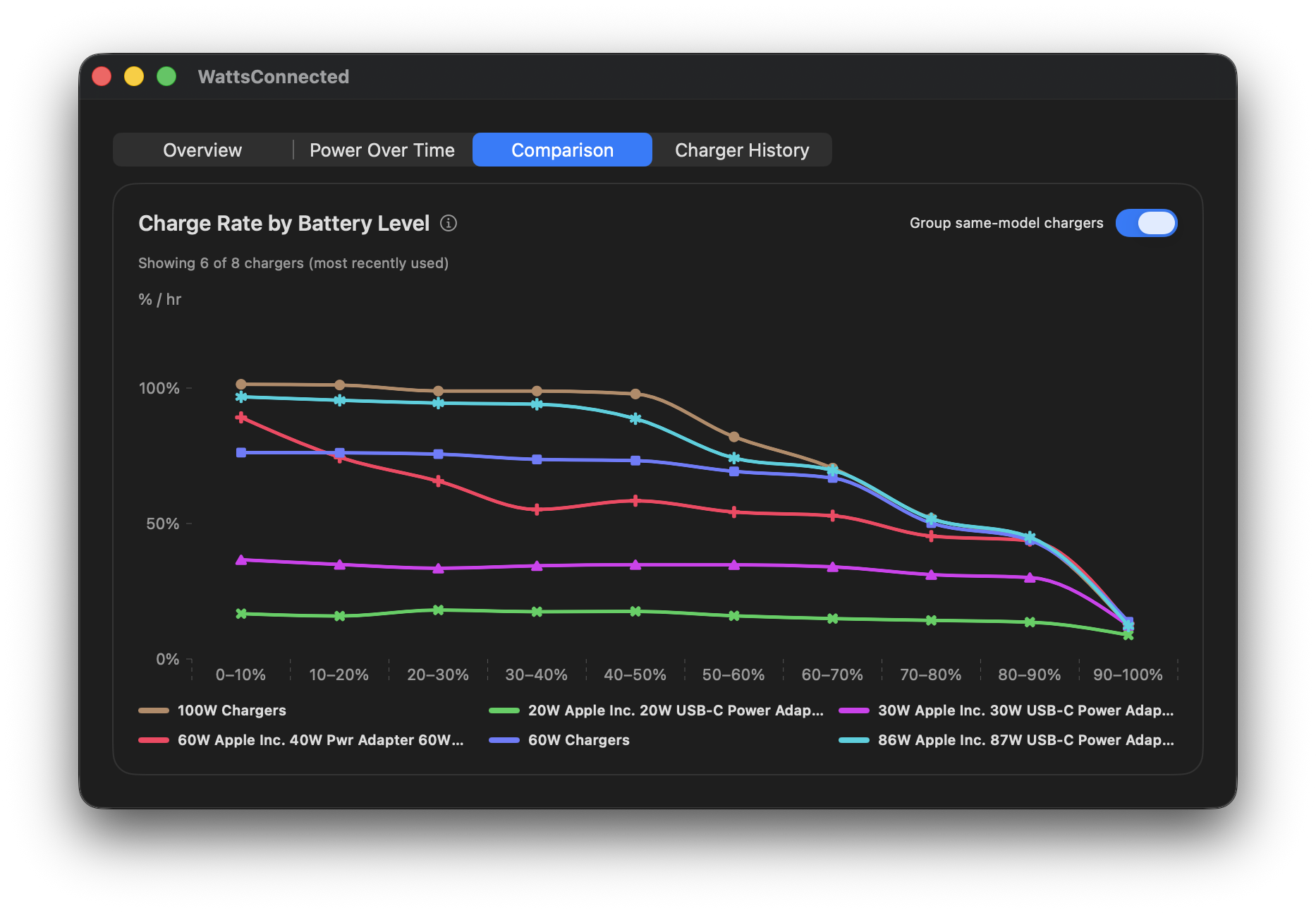
How to read this chart
The x-axis buckets battery level in 10% increments; the y-axis is charge rate in percent per hour. Each line is one charger. Higher on the chart means the battery is filling faster at that battery level.
What the data actually shows
Below about 40-50% battery, wattage separates the chargers dramatically. The 100W and 86W chargers hold close to 90-100%/hr for the first half of the charge. The 30W adapter never gets above roughly 35-40%/hr even at 0% battery, and the 20W adapter sits around 20%/hr practically the entire time — it simply can't deliver more than that, regardless of how empty the battery is.
But look at the far right of the chart: by the 80-90% and 90-100% buckets, every single charger — 20W and 100W alike — converges to roughly the same low charge rate, somewhere around 5-10%/hr. The gap that was a 5x difference at 10% battery has essentially disappeared by 90%.
Why this happens
This lines up with how lithium-ion batteries charge in general: a fast, high-current phase while the battery is emptier, then a slower, current-limited phase as it approaches full — a property of the battery and charging circuitry itself. Once your Mac is only requesting a small amount of power, a 100W charger has nothing left to prove over a 20W one.
What this means practically
If you need a fast top-up starting from a low battery, charger wattage is worth caring about — grab the highest-wattage charger you own. But if you're just topping off the last 10-20%, don't bother hunting for your fastest charger; at that point, even a 20W adapter is nearly keeping pace with a 100W one.
See this on your own Mac
This isn't something you can get from a spec sheet, since it depends on your specific chargers and your specific battery. WattsConnected tracks every charging session automatically — open the Comparison tab and the Charge Rate by Battery Level chart builds itself up over time as you use whatever chargers you already own, no setup required.
A Few Notes
This is one MacBook Air's real-world usage, not a controlled lab test — ambient temperature, battery health, and how often each charger actually gets used all factor in.
This data also reflects light-to-moderate use while charging — web browsing, email, everyday productivity apps — not sustained heavy load. Under demanding tasks like video export or compiling code, the Mac itself draws more power, so charger wattage matters more even at higher battery levels: a lower-wattage charger may struggle to keep up with the load, or lose ground on the battery, in situations where a higher-wattage charger wouldn't. But don't worry — WattsConnected can warn you when that's happening.